Autodesk Robot Structural Analysis is a powerful tool for structural engineers, offering advanced capabilities for modeling and analysis. If you are a student looking to gain hands-on experience with this software, you might be wondering if it’s available for free.
The good news is that Autodesk offers a free version of Robot Structural Analysis for eligible students through the Autodesk Education Plan. However, there are specific criteria you must meet, such as being enrolled in a recognized educational institution and meeting the minimum age requirement.
While the free version provides most features needed for educational purposes, the premium Pro version offers additional benefits. We will discuss the eligibility criteria for free access, how to get started, and the key differences between the free and Pro versions of Autodesk Robot.
Criteria for Free Access to Autodesk Robot Structural Analysis for Students
To access Autodesk Robot Structural Analysis for free, you need to meet specific criteria, such as:
Student Status
How do you make sure you’re eligible for free Autodesk Robot Structural Analysis as a student? First, you need to be enrolled at a qualified educational institution. This includes accredited middle schools, high schools, colleges, and universities.
If you’re homeschooled, you can still qualify, but you must provide the necessary documentation, such as proof of membership in a recognized homeschooling body. Make sure your institution meets Autodesk’s requirements to verify you can access the software without any issues.
Age Requirement
When seeking free access to Autodesk Robot Structural Analysis as a student, it’s essential to meet the age requirement set by Autodesk.
Generally, you need to be at least 13 years old to qualify for the Education Plan. This age limit ensures that you can legally engage with the software and its associated resources, adhering to local laws and regulations.
If you’re under 13, you might need permission from a guardian or wait until you reach the required age. Always check your specific location’s regulations, as they can vary.
Educational Institution
Accessing Autodesk Robot Structural Analysis for free hinges on your enrollment in a recognized educational institution.
To qualify, your institution must be acknowledged by Autodesk as a qualified educational entity. This means it should be accredited by a governmental agency, specifically for the purpose of providing education to enrolled students.
If you’re attending a university, college, or technical school that meets these criteria, you’re likely eligible for free access.
It’s vital to verify your institution is on Autodesk’s list of recognized schools. Once confirmed, you can take full advantage of the software for your studies without any cost.
Eligibility Verification
To gain free access to Autodesk Robot Structural Analysis, you must verify your eligibility through the Autodesk Education Community.
Autodesk will confirm your status as a student or educator, which may involve validating your enrollment or employment at a qualified institution. Keep in mind that you might need to submit additional documentation to complete this process.
Once your eligibility is confirmed, you’ll gain free access to Autodesk Robot Structural Analysis along with other Autodesk software included in the Education Plan.
How to Access Autodesk Robot as a Student?
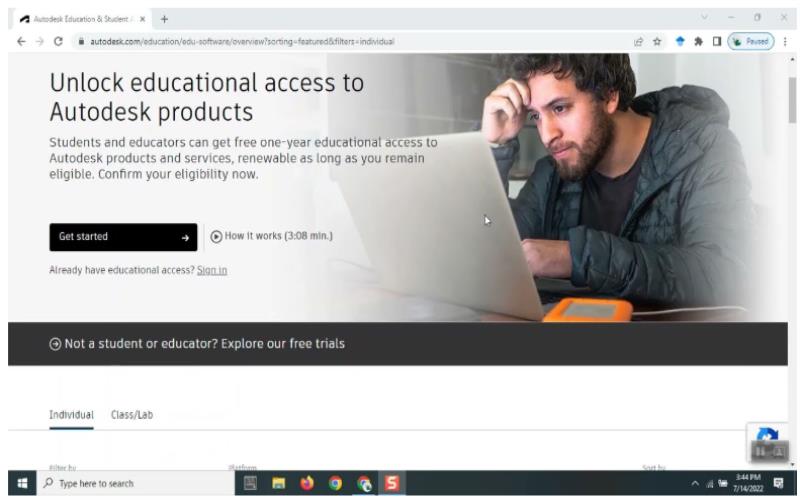
To access Autodesk Robot as a student, simply follow these steps:
Create an Autodesk Account
If you don’t have an account yet, head over to the Autodesk Education Community website and click on “Get Started.” You’ll need to use your school-provided email address when creating your account.
Confirm Your Eligibility
During the registration process, you’ll need to confirm your status as an enrolled student at a qualified educational institution. This involves providing accurate information about your school and program.
In some cases, Autodesk may request additional documentation to validate your status, such as your student ID or proof of enrollment. Make sure you have these documents ready to streamline the process.
Select Autodesk Robot Structural Analysis
After confirming your eligibility as a student, the next step is selecting Autodesk Robot Structural Analysis.
Start by maneuvering to the product selection page on Autodesk’s website. Here, you’ll find a list of available software tailored for students. Look for Autodesk Robot Structural Analysis among the options. Once you’ve located it, click on the “Get Started” button to initiate the selection process.
Download and Install the Software
After confirming your eligibility, Autodesk will grant you access to download the software. Follow the instructions on the website to download Autodesk Robot Structural Analysis and install it on your computer.
If you already have the software installed, you must click “Download” again to trigger the product entitlement and ensure you have the educational version.
Sign In and Use the Software
Once installed, sign in with your Autodesk account to activate Autodesk Robot Structural Analysis. You can now start using the software for your educational projects.
Remember, your free access is valid for one year, and you will need to renew it annually as long as you remain eligible.
Differences Between Autodesk Robot Structural Analysis Free vs Pro
When comparing Autodesk Robot Structural Analysis Free and Pro, you’ll notice key differences in license type and purpose.
License Type and Purpose
The free version, offered under the Education Plan, is strictly for educational use. You can utilize it for personal learning, academic projects, and research, but commercial use is off-limits. This version is tied to your student status, and access expires once you no longer qualify as a student.
In contrast, the Pro version is designed for professional use. With a commercial license, you can use Autodesk Robot Structural Analysis for business projects, bill clients, and enjoy unrestricted usage.
If you’re short on money but need the Pro version, checking for a discount on the Autodesk Robot Structural Analysis price could be a smart option. Many promotions or educational discounts may allow you to access the software at a lower cost, making it a more affordable choice for those on a budget.
Features and Functionality
Autodesk Robot Structural Analysis offers a range of features and functionality that differ greatly between the free Education version and the Pro version.
While the Education version provides access to core functionalities for structural analysis and modeling, it may include watermarks on printed outputs. You won’t have access to the latest advanced features or updates found in the Pro version.
On the other hand, the Pro version includes all the features from the Education version but allows you to perform large-scale commercial projects without any restrictions.
Additionally, you’ll benefit from priority access to new features and enhanced technical support from Autodesk. This makes the Pro version the better option for professionals looking for extensive capabilities.
Support and Updates
Support for Autodesk Robot Structural Analysis varies widely between the free Education and Pro versions.
As a student using the Education version, you’ll find that Autodesk offers limited support. You can access online resources like tutorials, forums, and help articles, but direct customer service or technical support may not be readily available.
In contrast, if you opt for the Pro version, you’ll enjoy full access to Autodesk’s technical support services. This includes phone and email support, live chat, and in-depth troubleshooting assistance.
Additionally, Pro users receive immediate access to updates and patches as they’re released, ensuring you stay current with the latest features and fixes. This difference in support can profoundly impact your experience with the software.
Access Autodesk Robot Structural Analysis and Maximize Your Learning or Professional Projects
In summary, Autodesk Robot Structural Analysis is indeed free for students who meet specific eligibility criteria. By providing proof of enrollment and creating an Autodesk account with a school email, you can easily access the software for a year.
The free version is perfect for educational purposes, offering core functionalities for structural analysis. However, if you’re looking for commercial use or advanced features, the Pro version may be a better fit. Keep in mind that if you’re on a budget, checking for discounted Autodesk Robot Structural Analysis price is a good way to access the Pro version affordably.